Roadwise States South Carolina Driving lessons Parking South Carolina driving lesson · General Driving
Parking A 4-minute lesson from the South Carolina course. Read the rules and examples, follow the handbook page references, and check your understanding before you move on.
Read time 4 minutes
Course unit General Driving
Checkpoint questions 6
Source pages 85, 86, 87, 88, 89 You're responsible for making sure your parked vehicle isn't an obstruction. Park only where it's allowed, close to the curb, and secure the car so it can't roll.
Know the rule
Vehicles with a disability plate or placard may use disability spaces only when driven by, or transporting, the person with the disability whose name is on the registration.
Handbook p. 85 ↗ Know the rule
Always park in a designated parking area. Along a roadway, park as far from the flow of traffic as possible.
Handbook p. 85 ↗ 18 inches Maximum distance from the curb or edge of pavement when parking
Handbook p. 86 ↗ Know the rule
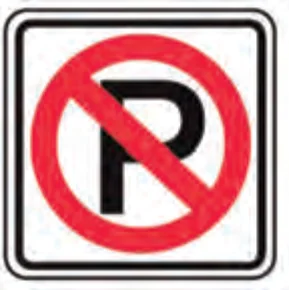
No-parking zones are marked by signs or painted curbs. Some parking restrictions are shown by colored curb markings.
Handbook p. 86 ↗ No parking sign Entering a perpendicular or angle space: Identify the space and check traffic Signal your intentions Move forward slowly, steering left or right until you reach the middle of the space Center the vehicle in the space Move to the front of the space, stop and secure the vehicle Handbook p. 86 ↗ Exiting a perpendicular or angle space: Check for traffic in all directions Keep checking and back straight until your front bumper clears the car beside you Turn the wheel sharply in the direction the rear should move When you clear the space, stop and shift to drive Accelerate smoothly, steering to straighten the wheels Handbook p. 87 ↗ Entering a parallel parking space: Identify the space, check traffic and signal When clear, shift to reverse and look to the rear where you'll move Back slowly, turning the wheel rapidly, until your front bumper lines up with the rear bumper of the car ahead Keep backing slowly, turning the wheel rapidly to center the vehicle Stop before touching the car behind; shift to drive and adjust Handbook p. 87 ↗ Exiting a parallel parking space: Check traffic, brake, shift to reverse, and back up as far as possible toward the car behind Signal, check mirrors and over your shoulder, shift to drive and move forward slowly into the lane Make sure your front bumper will clear the car ahead; if not, reverse and correct Move into the lane when your door clears the rear bumper of the car ahead Handbook p. 88 ↗ Know the rule
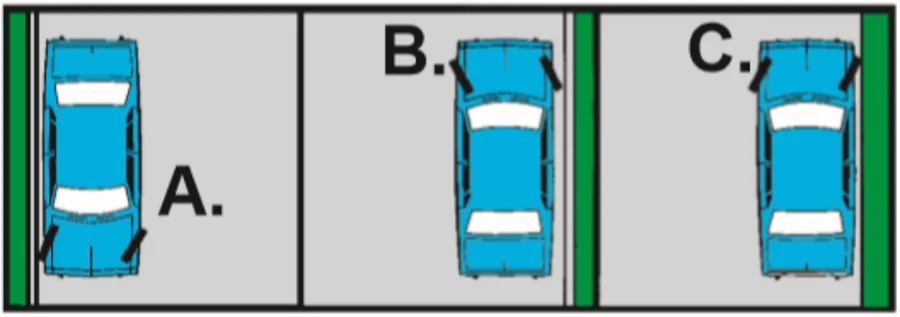
*Exception: when parking on the left side of a one-way street. In every case, set the parking brake, put the vehicle in park or the proper gear (first or reverse for a manual), and turn off the engine.
Handbook p. 88 ↗ A: downhill, B: uphill with curb, C: uphill without curb Know the rule
When leaving any parking space, signal, use your mirrors, look over your shoulder, and yield the right-of-way.
Handbook p. 88 ↗ Put it into practice
You park facing uphill on a street with a curb. Turn your wheels toward the center of the street and let the car roll back gently until the back of the front tire rests against the curb. Then set the parking brake, shift to park and turn off the engine.
Check your understanding Read the question, decide on an answer, then open it to check the explanation. These are Roadwise study questions based on the source handbook.
When parking along the roadway, you should not park more than how far from the curb or edge of pavement? 6 inches 36 inches 24 inches 18 inches Answer: 18 inches
Do not park more than 18 inches from the curb or edge of pavement.
Handbook p. 86 ↗ Vehicles displaying a disability placard may park in designated accessible spaces only if: It's driven by or carrying the placard holder Any family member is in the vehicle The placard is visible from outside The vehicle is registered in SC Answer: It's driven by or carrying the placard holder
The vehicle must be driven by or transporting the person with the disability whose name is on the registration.
Handbook p. 85 ↗ When parking downhill, with or without a curb, you should turn your wheels: To the left To the right Straight ahead Toward the center of the road Answer: To the right
Headed downhill, with or without a curb, turn your wheels to the right (except when parking left on a one-way street).
Handbook p. 88 ↗ When parking uphill with a curb present, you should turn your wheels: Toward the curb, front of the tire touching it Straight ahead Away from the curb, back of the tire against it To the left, a foot from the curb Answer: Away from the curb, back of the tire against it
Headed uphill with a curb, turn your wheels toward the center of the street with the back of the front tire against the curb.
Handbook p. 88 ↗ When parking uphill with no curb present, you should turn your wheels: To the left Straight ahead Either way, with the parking brake set To the right Answer: To the right
Headed uphill without a curb, turn your wheels to the right so the vehicle will roll off the road if the brakes fail.
Handbook p. 88 ↗ When entering a perpendicular or angle parking space, you should center the vehicle by: Creeping forward, steering as needed Stopping once the front bumper enters Turning sharply before reaching the space Passing the space and reversing into it Answer: Creeping forward, steering as needed
Move forward slowly, turning the wheel left or right as appropriate, until the vehicle is centered in the space.
Handbook p. 86 ↗ Previous lesson Rules for school buses Next lesson Changing lanes, entering & exiting highways About the source Roadwise’s South Carolina course uses the driver handbook edition supplied with this study pack. This lesson cites source pages 85, 86, 87, 88, 89. The linked PDF is a third-party mirror of the handbook, rather than a government-hosted page.
Open the handbook source PDF · View the source edition
For current application requirements, fees, appointments, and the format that applies to your age or license type, check South Carolina’s DMV. Roadwise provides study material and does not issue permits or licenses.